> For the complete documentation index, see [llms.txt](https://hashhedge.gitbook.io/hashhedge-user-guide/llms.txt). Markdown versions of documentation pages are available by appending `.md` to page URLs; this page is available as [Markdown](https://hashhedge.gitbook.io/hashhedge-user-guide/account-and-payouts/profit-payouts.md).
# Profit Share and Payouts
On a funded account you keep most of the profit you make and can withdraw it on a regular schedule.
80%
of the profit you generate
90%
with the +10% Profit Split add-on
$100
Minimum withdrawal
$10,000
maximum withdrawal per account per 14 days
***
## Your profit share
You keep **80%** of the profit you generate on a funded account. With the **+10% Profit Split** add-on, that rises to **90%**. Hash Hedge keeps the rest. See [Challenge types](/hashhedge-user-guide/start-here/challenge-types.md).
## When you can take a payout
A payout becomes available once **all** of these are true:
* The **14-day** payout period has passed (your dashboard shows the **days until payout** and the **payout date**).
* Your account is **in profit**.
* **All your positions are closed.**
{% hint style="info" %}
On the **Instant Challenge**, the condition is different: instead of a one-time profit target, you need **5 profitable days**, and you choose your own payout period, from 14 to 60 days after your first trade. See [Instant Challenge Payouts](/hashhedge-user-guide/account-and-payouts/instant-challenge.md).
{% endhint %}
## How a payout works
{% stepper %}
{% step %}
### Move your profit to the Wallet
On the Challenge **dashboard**, click **Withdraw profit**. Your profit share moves from the trading account into your **Wallet**.
{% endstep %}
{% step %}
### Open your Wallet
Click **Wallet** in the left-hand menu. At the top you'll see your **balance** and the total withdrawn so far. Click **Withdraw**.
Wallet page
{% endstep %}
{% step %}
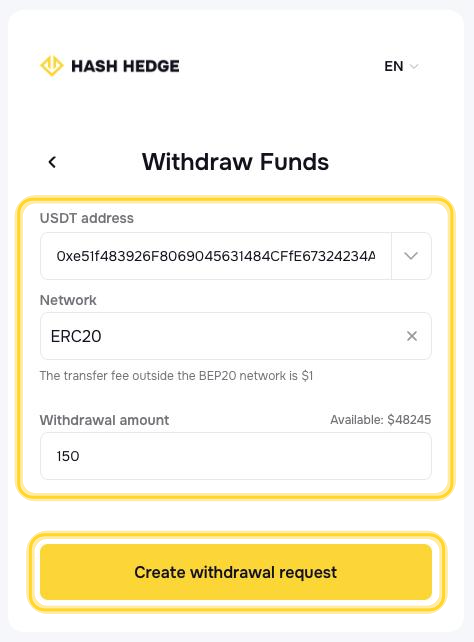
### Create the withdrawal request
* **USDT address**: the wallet address that will receive the funds.
* **Network**: choose your network.
* **Withdrawal amount**: enter an amount within the available balance (minimum $100, maximum $10,000).
Then click **Create withdrawal request**.
Withdraw funds form
{% endstep %}
{% step %}
### Track the request
Your request appears in **Withdrawal History** and moves through these statuses:
* **In progress**: the request has been received.
* **Approved**: the request has been approved for payout.
* **Completed**: the funds have been sent. You'll see the on-chain transaction hash.
{% hint style="info" %}
Funds are transferred to your wallet within **72 hours** of submitting your withdrawal request.
{% endhint %}
{% endstep %}
{% endstepper %}
## Payout limits
* **Minimum** withdrawal: **$100**.
* **Maximum** withdrawal: **$10,000** per account per 14 days.
* A new request can be made no earlier than **14 days** after your previous request was completed.
* Your balance must be enough to cover the requested amount.
Regular payouts from a funded account also count toward growing that account for free: see [Scaling Plan](/hashhedge-user-guide/account-and-payouts/scaling-plan.md).
***
Payouts are paid in USDT. Double-check the wallet address and network before submitting. Crypto transfers can't be reversed once sent.
---
# Agent Instructions
This documentation is published with GitBook. GitBook is the documentation platform designed so that both humans and AI agents can read, navigate, and reason over technical content effectively. Learn more at gitbook.com.
## Querying This Documentation
If you need additional information that is not directly available in this page, you can query the documentation by asking a question.
Perform an HTTP GET request on the following URL with the `ask` and `goal` query parameters:
```
GET https://hashhedge.gitbook.io/hashhedge-user-guide/account-and-payouts/profit-payouts.md?ask=&goal=
```
`ask` is the immediate question: it should be specific, self-contained, and written in natural language.
`goal` is what the user is ultimately trying to achieve, the reason they need the answer. Sharing it helps GitBook give you a better, more relevant answer. A goal is most helpful when it describes the outcome the user wants rather than restating the question. For example, with `ask=how do I create an API token`, a goal like `automate deployments from our CI pipeline` lets GitBook tailor the answer to that use case.
The response will contain a direct answer to the question and relevant excerpts and sources from the documentation.
Use this mechanism when the answer is not explicitly present in the current page, you need clarification or additional context, or you want to retrieve related documentation sections.